Showing posts with label IT cabling canary wharf. Show all posts

Wednesday, August 31, 2022

Is Cat6 Cable Better Than Cat5e?

 Should Cat6 Cabling Replace Cat5e?

Computer networks are an essential part of modern life, but for a network to be effective it needs to transfer data at high speeds. Achieving this is made possible with data cables. However, you need to have the correct cables in place. The traditional data cabling used was Cat 5, along with its enhanced successor Cat 5e. However, Cat 6 cabling has also been available for some time and represents one of the most popular and efficient data cabling solutions.

What is Cat6?

Cat 6 cabling uses four pairs of twisted copper cables and is specifically designed to be used in computer networks that utilize ethernet technology. Capable of operating at bandwidths reaching 250MHz, it’s also capable of transmitting data at high speeds. At distances of up to 100m, Cat 6 cables can move data at speeds of 1 Gbps. However, if this distance is lowered to 55m, a Cat 6 cable can increase this speed to 10 Gbps. Cat 6 cabling is also highly resistant to electrical interference, and this ensures data cabling Westminster quality is less likely to be compromised.

What Are the Benefits of Cat6?

If you are considering whether Cat 6 cabling should replace Cat5e it’s essential you understand all of its benefits:

Backward compatible: Cat 6 cabling was created as the successor to Cat 5 cabling and was designed to be backward compatible. Therefore, if your existing computer network is running on a Cat 5e-based infrastructure, it’s much easier to implement Cat 6 cabling gradually. This will not only reduce network downtime during installation but also allow you to invest in new cabling over a longer period.

Higher quality cables: the construction of Cat 6 cables means they are more tightly wound than Cat 5 cables, as well as feature thicker sheaths and cable conductors. These benefits combine to produce a cable that is both physically stronger and more efficient in terms of electrical performance.

Enhanced network performance: making the step up to Cat 6 IT cabling canary wharf will provide your computer network with a significant boost in performance. Files can be sent and received much quicker, so you will become more productive and competitive.

What are the categories of cable?

As well as Cat 6 cables, there are a number of options available for your network needs:

Cat 5: this type of cable also uses twisted pair copper cables but is unshielded. With a top performance rated at 100Mhz and distances of 100m covered, Cat 5 cables transmit data at speeds of up to 100MBps. An enhanced version, known as Cat 5e, is also available and can transfer data at a speed of 1Gbps.

Fiber optic: using glass fibers that carry light signals, fiber optic cables can send data over distances of 10km with speeds that can vary from 10Gbps to 100Gbps. The most modern data cable solution, fiber optic is also the most expensive option.

Cat 5e or Cat 6?

If you find your existing cables are failing and you need to replace Cat5e to keep pace with the demands of your network, then it’s likely that upgrading to Cat 6 cables will provide the speed and efficiency you need. If, however, your Cat 5e network allows you to remain productive, then an upgrade to Cat 6 cabling will represent an unnecessary investment.

Original Source: Is Cat6 Cable Better Than Cat5e?

Monday, August 1, 2022

What Is A Data Cable?


What is a data cable?

A data cable is a cable that connects two devices for the purpose of transferring data. Data cables can be broken down into three main types.

1. Twisted pair cabling.

2. Coaxial cabling.

3. Fibre optic cabling.

In this blog post, we will discuss what each type of data cable is and where they are used most often by breaking them down into these categories.

How to Choose the Right Category of Data Cable

There are a few things you should keep in mind when choosing the right category of data cable:

1. The type and quality of cabling are determined by its performance characteristics, such as speed or power.

2. Data cables must be selected based on their intended use. For example, network cables can vary depending on how many applications will run over them at one time. You may also need to consider distance limitations.

3. The most common choice is Copper Category Cables which are made up of twisted pair wires covered by an outer sheath (shield). Twisted pair wire conductors consist of two uninsulated copper wires wrapped around each to minimize interference. In addition, 4 pairs are contained in a single cable.

4. the higher the category number (CAT), the greater the speed and distance performances of the cable. For instance, a Cat 7 cable is faster and can support longer distances than a Cat 6 cable.

Twisted Pair Cabling

Twisted pair cabling is the most common type of data cable which you can get from IT Cabling London and is made up of two insulated copper wires that are twisted together. This type of cabling is used in a variety of applications such as home networks, office networks, and even audio/video applications. The most common types of twisted pair cabling are Cat cables.

1. Cat5e Cabling.

2. Cat6 Cabling.

3. Cat6a Cabling.

4. Cat7 Cabling.

5. Cat8 Cabling.

Cat-cable or Category cable is the most commonly used and versatile type of copper cabling which has been proven to be extremely reliable. This category was first introduced as Cat5 in 1995 by the Electronic Industries Alliance (EIA). The standard for Cat cables is regularly updated, but their name always remains consistent. The category is usually ratified to the performance the cable is capable of over a set distance of 90 metres of a permanent link.

Shielded Twisted Pair Cables

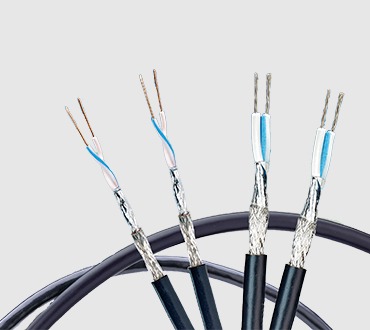
Twisted pair cables are also available with special shielding, which can help minimize interference from other devices such as microwaves and cell phones. These types of shielded cables are referred to as STP (shielded twisted pair) category cables.

Shielded data cables are typically used in situations where the cabling needs additional protection from EMI (Electrical Magnetic Interference) and RFI (Radio frequency interference).

This type of cabling is often used in industrial or medical settings where there is a greater risk of noise and interference. Shielded cables have a metal foil or braid shield around the conductors to help reduce unwanted signals.

Coaxial Cabling

Coaxial cabling consists of one copper wire that surrounds another insulated copper wire. This type of data cable is used mainly in video applications such as CCTV, security systems, and satellite TV installations. Coaxial cabling has a higher bandwidth capacity than twisted pair cabling.

Coaxial cabling is a type of data cable that uses an inner conductor surrounded by an insulating layer, covered by a braided shield, and finally covered by an outer sheath. This type of cabling is used in home cable services and business networks.

Categories for coax cables are divided into two:

1. - Foam Polyethylene Insulation (Foamed-PE).

2. - High-Density Polyethylene Insulation (HDPE).

Uses for Coaxial cabling include

Data Centres, telephone and cable TV systems, and large-scale mobile phone booster installations.

Fibre Optic Cabling

Data cables can also be made up of fibre optic cabling. This type of data cable is a glass or plastic core with an insulating layer surrounded by ultraviolet light transmitting fibres that are covered in protective materials.

Optical fibre cables work largely the same way that normal twisted pair cables do except for one key difference. Instead of sending electrical signals down the wire they send light pulses through an optical glass tube, otherwise known as an optical core. These signals can travel tens of thousands of kilometres.

The main advantage to using fibre optic cables over copper is higher bandwidths which allow for large amounts of data transfer at high speeds without the need for repeaters. This is because they have multi-gigabit capacities. These signals don't degrade as much over long distances. There are fewer distance limitations on fibre optics compared to copper data cables.

Common uses of data cables 

Now that we have discussed what each type of data cable is, let's take a look at where they are used most commonly.

Twisted pair cabling is by far the most popular type of data cable from IT Cabling Canary Wharf. It can be found in a variety of applications such as home networks, office networks and even audio/video applications. Coaxial cabling is mainly used for video applications. It can be found in products such as televisions and video players. Fibre optic cabling is the most advanced type of data cable. It is often used in high-speed applications such as networking, telecoms and datacentres.

Is Ethernet and data cable the same?

No. Ethernet and Data cabling is not the same thing, although they are closely related to each other in terms of function.

Ethernet was developed as a method for connecting different types of devices together on a network such as computers, printers, routers, etc... However data cables were designed to connect these various Ethernet devices together. This is achieved by sending electrical signals down the wire at high speeds that allow it to send information quickly between them (e.g 1000Mbps).

Original Source: What Is A Data Cable?

Saturday, July 2, 2022

What is a Data Cabinet

 A data cabinet is a piece of equipment that is used to store, organise and protect network equipment. Data cabinets are often referred to as racks, network cabinets, or cab's. Cabinets are usually made of metal, plastic, or glass. In addition, the cabinets will have multiple shelves. Each shelf will be used for various equipment such as routers, switches, and modems. Furthermore, data cabinets can also include features such as cooling fans and cable management systems. Data cabinets help to keep data organized and protected. They can also help to improve the efficiency of data retrieval.

Data cabinets come in different shapes and sizes. The size of the cabinet will be determined by the size of your IT cabling canary wharf infrastructure and IT equipment. There are a number of options available when it comes to finding the correct cabinet for your needs.


What are the different types of cabinets? 

As previously stated, data cabinets are often referred to as racks, network cabinets, or cabs. Commonly when an individual uses one of these phrases they're referring to the same thing. However, technically there is a difference. A cabinet is a unit that is closed on all sides, including the top & bottom. Racks do not have sidewalls, they're open. Commonly, they're referred to as open frame racks.

Different types of racks/cabinets 

1. Comms Cabinet

2. Equipment Cabinet

3. Server Cabinet

4. Wall Cabinet

5. CoLo Cabinet

6. Open Frame Rack 

Data Cabinet Airflow 

When allocating the space for your cabinet, the prevention of fire is of the utmost importance. The cooling strategy of your comms rooms plays a crucial part in protecting your premises from a fire. Additionally, the damage caused by heat is not always evident and catastrophic as a fire or meltdown. A well-designed cooling system will help to increase the lifespan of your equipment, preventing issues such as unexpected node crashes or system failures.

The biggest mistake is not factoring in the cooling when designing this space. Most network cabinets are 42U high, which is 7 feet tall. Depending on the equipment being used, it could be generating a lot of heat. The standard rule of thumb is 1U for every 10-15 watts of power being used. If you have a 42U cabinet, and it’s full of equipment that uses 1,000 watts, you could be looking at a heat load of approximately 68,000 BTUs. That is a lot of heat!

There are a few different options for cooling data cabinets: 

Air conditioning: This is the most common method of cooling data cabinets in data cabling Watford. The air conditioner will remove the heat from the air and circulate it back into the room. An open frame cabinet will be suitable for this environment, the open sides will prevent your equipment from overheating. To ensure that your equipment is operating within the recommended temperature range you must monitor the room temperature. The simplest way to do this would be a room thermometer that is checked regularly. 

Air cooled: This type of cooling system uses fans to circulate the air around the equipment and exhaust the hot air out of the cabinet. Furthermore, for the best cooling solution, all exhaust fans in your comms room must be installed facing the same direction. As a result, it allows the air to flow in the same direction. Lastly, having exhaust fans at the top or back of your cabinet will aid in removing the warm air faster.

Liquid-cooled: This system uses a coolant to remove the heat from the equipment and circulate it back into the room. A water-cooled system circulates water through a network of tubing to remove heat from components. The water is then cooled using a radiator, much like the one in your car, and circulated back through the system. 

How to choose a data cabinet? 

When choosing a data cabinet, it is important to consider the following: 

  1. The capacity of the cabinet (how many shelves and how much data it can hold)
  2. Security of the cabinet (how well it protects data from unauthorized access)
  3. Accessibility of the cabinet (how easy it is to retrieve data from the cabinet)
  4. The durability of the cabinet (how well it withstands wear and tear)
  5. The price of the cabinet

Original Source: What is a Data Cabinet

Tuesday, November 2, 2021

What is Single Pair Ethernet (SPE)

 In May 1973 while working at Xerox PARC, Bob Metcalf introduced the concept of ethernet. Following this, IEEE turned the Ethernet concept into a global standard in 1983 with the release of IEEE Std. 802.3a, this supported 10Mb of data transmission over a coaxial cable. The advancement of Ethernet took another progressive step in 1990 by developing IEE Std. 802. 3i, this was built to support the 10BASE-T application, providing 10Mb of data transmission over the twisted-pair network cabling London.


Since then, the evolution of ethernet has grown rapidly. Quickly moving on from coaxial to twisted-pair copper cabling. This change saw an increase in transmission speeds and reduced costs. To begin with, only two twisted pairs were used, but this soon evolved to four pairs to achieve higher data rates. Now Ethernet is one of the most commonly used protocols for transmitting data between electronic devices. So, what is a single pair ethernet (SPE)? 

What is SPE?

Traditional ethernet cables from the LAN sector or Industrial Ethernet cables use two or four pairs of wires depending on the transmission rate.

Single pair Ethernet cables only contain one twisted pair (single pair). Single twisted-pair cabling was first used in the 1870s, instead of having two straight wires next to each other, the conductors were twisted together to improve the electrical performance. The twisting of the conductors resulted in the cancellation of unwanted electrical noise from nearby pairs or other sources. In the 1870s, single twisted pair cabling was used to interconnect telephones.

Centuries later, the single twisted pair cabling is still in use. The use of this cable is now commonly found in building automation, industrial, and automotive applications. SPE offers additional advantages in comparison to the traditional cable. 

For example

1. Thinner bending radii 

2. Smaller cables. Saves material and costs. Great for weight and space-saving designs.

3. Transmission rates of up to 1Gbit on a single pair

4. SPE cable design enables much faster /easier installation, reducing errors in assembly

5. Single Pair Ethernet uses PoDL to supply terminal devices with up to 50W via the data line.

6. Lower caloric load, less smoke development 

SPE Power delivery

To enhance its usefulness, IEEE developed the ability to transmit power and data over the same twisted pair. Power transmission over 4-pair Ethernet cabling is commonly called Power over Ethernet (PoE). Power transmission for SPE IT cabling London is referred to as Power over Data Lines (PoDL). This standard specifies multiple classes of powered devices delivering between 0.5 and 52 watts of power. It’s important to realize, although PoDL technology is not compatible with the existing 2 and 4 pair POE equipment. It has the same advantages as PoE as it provides for centralized power control and backup power.

SPE Cables

Single Pair Ethernet cables are built to support a maximum frequency that corresponds with one or more IEEE applications. Additionally, there are also separate standards for patch cables and horizontal cables. Although it's possible to manufacture patch cords from horizontal cables, patch cables generally employ stranded conductors instead of solid ones. Thus, offering increased flexibility at the expense of diminished electrical performance over long lengths. 

SPE connectors

The interfaces discussed in the IEC 63171 standards for connector types 1-6 are open-sourced, allowing any manufacturer to make connectors with the interfaces. As a result, this will increase the likelihood of broad industry adoption. Manufacturers maintain the common interface; however, they have innovative freedom. They can implement proprietary features in other areas of the connector design. 

Original Source: What is Single Pair Ethernet (SPE) 

Saturday, July 3, 2021

Large Area WiFi

 Wi-Fi is a crucial element in any building where there are people, be it a domestic or a corporate setting. But, when you’re dealing with a Large Area of Wi-Fi, you need to be more advanced than just having a router. Wi-Fi technology has certain limitations associated with it, so it’s important that you understand how to work around these restrictions. Thankfully, as long as you learn the best ways to solve these problems, Wi-Fi in a large building should pose no issue.


Planning a Large Area Wi-Fi

Long before you start to install Wi-Fi equipment, you need to draw up a plan to minimize potential hurdles further down the line. In particular, make sure that you.

Create a Cabling Plan: Designing a thorough cabling plan is essential. Not only do you need to take your employees' productivity into consideration, but you also have to evaluate the specific needs of the building e.g. access points, ceiling cavities, etc. Scalability, of course, is another area to consider, so it makes sense to plan for future expansion. Finally, you will also need to plan which type of data cabling Watford you need and what your budget allows. Following these strategies will almost guarantee that your installation runs smoothly.

Correctly Position Wi-Fi Equipment: The signal for large area Wi-Fi needs to cover a large amount of ground; you can help your setup achieve this by positioning wireless equipment correctly. Evaluate the space that your Wi-Fi needs to cover and install wireless access points accordingly.

Choose the Right Equipment: Wi-Fi solutions for large buildings will be considerably more complex than those used in smaller locations. This means that you are going to need to invest in some serious technology to meet your location’s needs. Make sure that you cover these requirements with vendors before making any purchases. 

Common Large Area Wi-Fi Problems

All technology has the capacity to fail and cause problems; Wi-Fi is no different. Here are some of the most common Wi-Fi problems: 

Slow Connection Speeds: The main bugbear of any Wi-Fi user is slow speeds. These are often caused by installation problems, so your Wi-Fi equipment is the best place to start troubleshooting. Are, for example, your access points facing the right direction? Additionally, it may be that your access points are inadequately positioned to cover the necessary distance. 

Interference: Wi-Fi uses radio waves to send signals between devices and these transfers can easily be disrupted. The interference can be generated by power sources, cordless phones, and even microwaves. The impact of this signal disruption can quickly result in network dropouts and a reduction in productivity.

Incorrect Cabling: Cat5 and Cat6 cabling will allow you to run Wi-Fi connections over distances of around 100 metres. But, over that, they will struggle to deliver any sense of performance. And, in a large building, you may need to cover larger distances. Therefore, it may pay to investigate fibre cabling, this will allow you to transmit data over much larger distances.

What is the maximum range of Wi-Fi?

The range of a Wi-Fi signal, using traditional network cabling London, is around 100m, but this range can now be extended with fibre optic cable to a distance of up to 2,000m. Naturally, each building will have different needs and this is why a firm plan is crucial. So, by taking the time to invest some effort into your Wi-Fi structure, you should soon reap the benefits of a powerful Wi-Fi service.

Original Source: Large Area WiFi

Wednesday, June 2, 2021

What are the VoIP Cabling Requirements When Installing a New Phone System?

 When planning for a new telephone system installation, the first consideration should be on the infrastructure. Therefore, what data cabling do I currently have, or what are the VoIP cabling requirements that I will need.

VoIP or Voice over Internet Protocol is simply the transmission of voice communication over a data network, such as the internet. 


With a new installation, this is straightforward. Thus, you can have a new cabling design and installation to suit the new VoIP phone system. However, with existing data cabling there can be confusion.

In this case, there may be existing cabling, but it’s not suitable for several reasons. 

1. The existing data cabling is a legacy phone cable (Such as BT) and not suitable for data transmission.

2. There is existing data cabling, but its quality of installation is not suitable for VoIP. (VoIP requires a quality of service)

3. There are not enough ports for the required telephones.

4. The structured cabling is not centralized and therefore unable to be controlled by the new phone switches. 

In brief, where these situations are present, a new data cabling installation or upgrade is required. 

What should I plan for VoIP cabling requirements? 

VoIP telephones require a data cable to each phone that originates from a data cabinet with access to a data switch. To this end, the telephone switch hardware is installed in the data cabinets throughout a building, and the phones can be wired to any switch as long as they are linked.

The data cabling can be any category of cabling from Cat5e to above. Cat5e and Cat6a are the standard choices for 1-gigabit transmission speeds. Furthermore, the 10-gigabit transmission starts with Cat6a and above. However, 1-gigabit is more than adequate for VoIP transmission.

The IT cabling Canary Wharf installation has to be at a professional level. VoIP requires a quality of service (QoS) to enable uninterrupted call quality. Indeed, unlike WiFi or PC data transmission, VoIP will result in poor quality or dropouts with poorly installed data cabling. With the PCs, it might just result in a slow loading or drop out of a hardly noticeable web page. However, with a phone, it can be an echo, buzzing, or loss of call. In short, all very frustrating and potentially costly if losing potential customers.

You may have existing cabling and not be sure if it's suitable for VoIP. 

Elements of a suitable data cabling installation for VoIP 

For the most part, the following elements should all be part of a cabling installation for VoIP.

A minimum of Cat5e with Cat6 and Cat6a preferred if scaling for higher speeds.

Installed with a well-known cabling brand

Many installations are undertaken with generic cheaper cabling systems, and these cause failure over time.

Installed onto Patch Panels inside a designated cabinet or set of cabinets

Avoid having the ends of cabling terminated onto plugs and plugged straight into switches. These fail over time

Terminated into designated outlet boxes

A dedicated cable for each telephone

Installed in correct containment and away from electrical cabling and interference

Electrical interference will cause noise and dropouts on the calls

Tested with a Fluke DSX or similar, and full test results supplied.

Without these, you will not know if the cabling is at the required standard and suitable for VoIP use.

The elements above should all be part of any data cabling installation. However, in many 

Evaluating existing structured cabling 

When you have existing data cabling Watford in place, there are similar checks you can put in place to check suitability. In this case, you would want to ensure the following

Check that there is enough cabling for each of your new phones.

Ensure that the existing cabling is Cat5e or above

Test your existing cabling with a Fluke DSX or similar 

The test results will show if the existing cabling passes to the required standard for all data transmission. With any failure, the cabling will need to be replaced to ensure good telephone performance.

Original Source: VoIP Cabling Requirements 

Friday, April 30, 2021

Structured Cabling for Your Office


The Best Structured Cabling for Your Office

If a modern office wants to maximize its productivity and efficiency then it needs modern cabling solutions. The common name for these modern groups of IT cabling London is structured cabling. And it’s something that your business needs to embrace. Naturally, you may be hesitant to take on a complete rewire of your office. But the benefits are so irresistible that it’s difficult to resist.


What is Structured Cabling?

The sheer number of devices that a modern office uses is remarkable. But it’s also crucial. After all, these devices help offices to enhance productivity by making complicated tasks easier. The majority of these devices rely on networks to run and this is where structured cabling comes in. Using twisted-pair Ethernet cables, structured cabling allows you to build an environment of connectivity where different devices can all be connected e.g. a PC network to a phone network.

Structured Cabling Standards

When it comes to data cabling there are a number of standards it must conform to which include:

How structured cabling enters premises and the manner in which it is terminated The details of any entrance facilities that the IT cabling Canary Wharf will pass through

Testing expectations and labeling methods for the cabling

Dimensions and build details of the communications room that the cables will enter

These standards, and many more, can be found within the BS 6701 guidelines which are part of the BS 7671 Wiring regulations.

Structured Cabling Categories

A number of different cabling categories are available that should be able to satisfy the needs of any office.

Cat 5 Cabling:

Available since 1995, Cat 5 cabling allows networks to deliver 10/100 MBps Ethernet capabilities up to distances of 100 metres. A number of improvements have been made to this category since 1995 with the latest specification being Cat 5e. This newest version of Cat 5e boasts less noise and crosstalk to deliver better data transmission.

Cat 6 Cabling:

Launched in 2002, Cat 6 cabling features copper wires which are wound more tightly than Cat 5 cabling. This has allowed it to deliver better performance with Gigabit Ethernet transmissions at distances of 100 metres and is perfect for offices. It’s also important to point out that Cat 6 cabling is fully compatible with Cat 5 cabling.

 Cat 7 Cabling:

Boasting a much thicker shielding than Cat 5 and 6 cablings, Cat 7 cabling is able to preserve data stability much better than its predecessors. Data transmissions of up to 40Gb can be achieved at 50 metres or even 100Gb at 15 metres. This is fantastic for smaller organizations, but a downside is that Cat 7 cabling is not compatible with Cat 5 or 6.

The Benefits of Good Office Cabling

Structured cabling has been developed to meet certain standards which bring a number of bene ts to its users. Therefore, if you go with a structured cabling system you can expect:

Simplicity: Structured cabling helps you build a uniform system containing either a combination of Cat 5 and 6 cables or one that contains only Cat 5, 6, or 7 cablings. This strategy allows you to minimize any complexities and makes identifying any network issues much easier. This reduces downtime and helps your office to remain productive.

Adaptability: The beauty of structured cabling is that it’s highly flexible. The high bandwidth associated with structured cabling helps you to easily integrate future applications as and when necessary. Installation of new hardware is equally easy to achieve thanks to the uniform cabling in place. Accordingly, your office can grow effortlessly and become a stronger unit with ease.

Cost-Effective: The initial install of structured cabling may seem expensive, but the long-term bene ts make it highly cost effective. Not only are IT costs lowered due to the simplicity it brings, but structured cabling also makes your employees more productive. This powerful combination will make significant savings over time and eventually pay for itself.

It is essential that you don’t underestimate the importance of cabling as part of your office setup. Proper cabling will help to ensure that you get the best from all your other equipment. For further information, don’t hesitate to get in touch.

Original Source: Structured Cabling for Your Office